
Qwen CLI
See the generated compatibility matrix for capability details and version-scoped evidence.
qwen-cli runs ctrlyoke workflows against Qwen Code while preserving the same step model, session controls, and validation hooks.
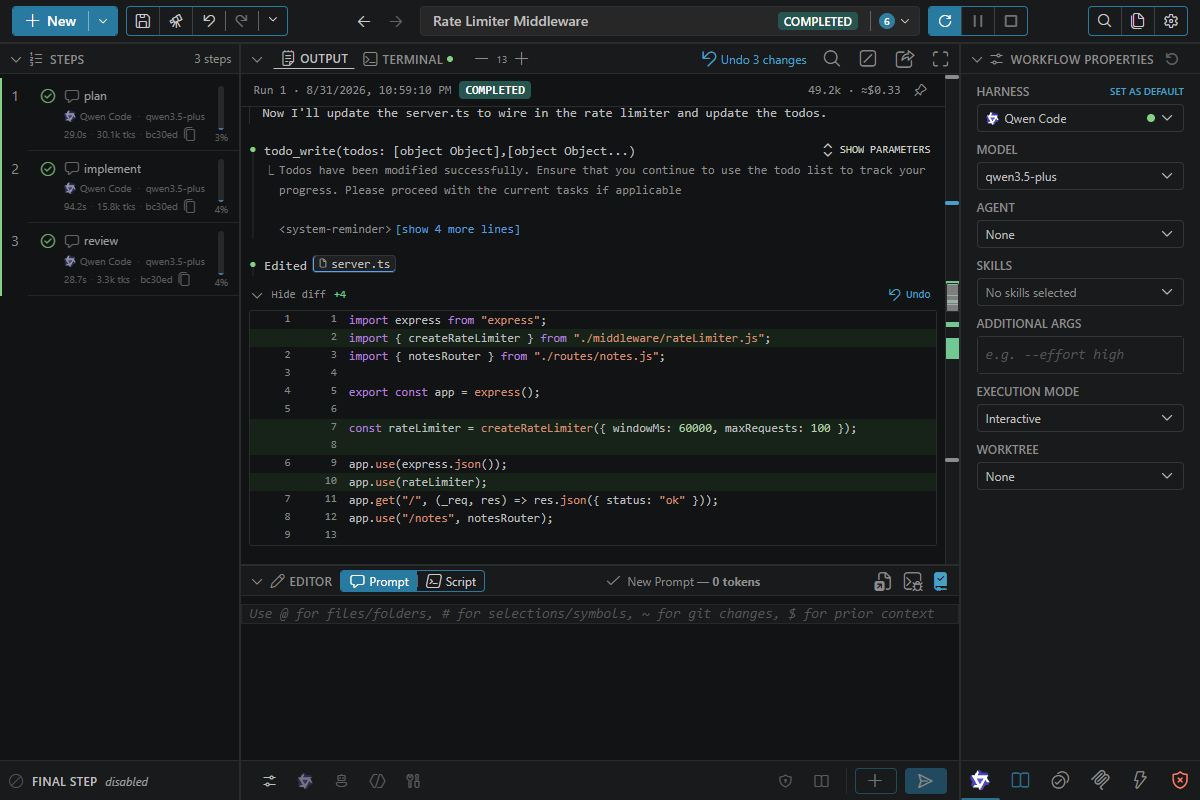
Good fit
- Teams that already use Qwen Code directly
- Workflows where you want the ctrlyoke queue, history, and script gating on top of Qwen
Prerequisites
- Command:
qwen, on yourPATH. - Install: see Install.
- Sign in: run
qwenonce in a terminal and complete the authentication it asks for. - Version: at least the minimum listed under Supported versions. Update with
npm install -g @qwen-code/qwen-code@latest.
If the CLI is missing, the harness picker shows a red dot next to Qwen Code, and its tooltip gives the install command. If it is installed but older than the minimum, it still runs: the picker shows an amber dot and the update command, a workflow that uses it warns when it starts, and a failed step repeats that command. After installing or updating, click Retry harness detection in the harness picker. If no harness CLI is available at all, the dashboard shows a No CLI coding agent is available panel with the install command for every harness.
Install
Install Qwen Code with its standalone installer:
macOS and Linux:
curl -fsSL https://qwen-code-assets.oss-cn-hangzhou.aliyuncs.com/installation/install-qwen-standalone.sh | bashWindows (PowerShell):
irm https://qwen-code-assets.oss-cn-hangzhou.aliyuncs.com/installation/install-qwen-standalone.ps1 | iexHomebrew (brew install qwen-code) and npm (npm install -g @qwen-code/qwen-code@latest, Node.js 22+) also work. Restart your terminal after installing.
See the Qwen Code README for other install methods.
Example
harness: qwen-cli
model: qwen3.5-plus

steps:
  - prompt: Audit @src/utils/ for duplicated logic and recommend one shared helper.
Headless prompts
In headless steps, ctrlyoke sends the prompt as Qwen's first stream-json stdin message. Generated sections such as agent instructions, skills and prior-step context are included in that message. Qwen's @path syntax is escaped in generated content, while workspace file references added by ctrlyoke remain available to Qwen. Turn off execution.inlineGeneratedPromptOnStdin to use categorized temporary files and references instead.
Subagents in headless steps
Headless steps run Qwen in its SDK mode, which lets ctrlyoke answer approval requests instead of hanging. In that mode Qwen's agent tool does not list any subagent types, including the built-in general-purpose and your user and project agents in .qwen/agents/. They all still run when a step names them, so name the agent in the prompt, for example "use the agent tool with subagent_type general-purpose". If no type is named, the model often picks fork, which Qwen always runs in the background in headless mode and which starts from a copy of the whole conversation. Interactive steps list every agent as before.
Model selection
The Model picker lists the model IDs under modelProviders in ~/.qwen/settings.json. ctrlyoke reads that file when it starts, so reload the window after you add a model there. If the file is missing or lists no models, the picker shows only qwen3.5-plus.
Set model on the workflow or on a step. Without one, ctrlyoke uses defaults.models["qwen-cli"], which is none out of the box: no --model flag is passed, so Qwen Code uses the model from its own settings (model.name).
Qwen Code 0.27 and later run their default model, without an error, when the requested model isn't listed under modelProviders. So before a step starts, ctrlyoke checks the model it is about to pass, including a --model in additionalArgs, against the modelProviders lists in Qwen's system, user and workspace settings.json. If any of them lists models and yours isn't one, the step fails before Qwen starts, naming the model. If none of them lists any models, ctrlyoke can't check beforehand. If Qwen then answers on a different model, the step finishes and shows a warning naming both models.
model: none passes no --model flag, so Qwen Code uses the model from its own settings. See How step properties inherit.
Permissions
Qwen does not support ctrlyoke's sandbox property. An explicit sandbox: true fails the step at launch because Qwen's available sandbox wraps the whole CLI, including ctrlyoke's MCP server and hooks. A true inherited from defaults.sandbox only warns. false passes --sandbox=false and sets QWEN_SANDBOX=false, which outranks the flag, so a sandbox enabled in Qwen's settings or environment is turned off. Qwen's separate tools.executionSandbox setting can't be overridden this way. null passes nothing. See Sandboxing.
The permission mode maps to Qwen Code flags:
dangerouslyAllowAll→-y. The deny list is ignored.allowAll→--approval-mode auto-edit, plus--exclude-toolswith the deny listauto→--approval-mode auto, plus--allowed-toolsand--exclude-tools. Headless runs also include bareShellToolso the judge can review shell calls.custom→--approval-mode default, plus--allowed-toolswith the allow list and--exclude-toolswith the deny listnone→ no permission flags (Qwen Code's own settings)
Each list is passed as one comma-separated value, translated to Qwen's tool names:
| ctrlyoke pattern | Qwen Code |
|---|---|
shell(git push:*) | ShellTool(git push *) |
shell(git status) | ShellTool(git status *) |
shell, shell(*) | ShellTool |
write | WriteFile |
edit | Edit |
read | Read |
webfetch | WebFetch |
websearch | WebSearch |
mcp__github, mcp__github__create_issue | unchanged |
A shell pattern without :* gets a trailing * too, as the git status row shows, so on Qwen Code it also covers the command with extra arguments. The default deny list therefore reaches Qwen as --exclude-tools ShellTool(rm *),ShellTool(del *),…. Qwen Code has no file-delete tool, so delete and remove patterns are skipped with a warning; use shell(rm:*) to control deleting files instead. Qwen Code cannot limit a headless write to one path, so an allowed write(<path>) or edit(<path>) is skipped with a warning and that write stays denied; a denied one denies every write. See Permissions for the modes, the pattern syntax and the default lists.
Notes
- ctrlyoke registers its completion hooks in the workspace
.qwen/settings.jsonfor the duration of a run, then restores the file. MCP servers are passed per process with--mcp-config. See Files ctrlyoke writes. errorhooks do not fire. See the compatibility matrix.- Qwen fires no Stop hook when an interactive turn fails with an API error. ctrlyoke still fails the step, with Qwen's error text, when the error is an authentication or permission error (HTTP 401 or 403), because Qwen never retries those. Qwen may retry any other API error, such as a rate limit, a server error or a dropped connection, and its session log does not say whether that retry gave up. ctrlyoke can't tell such a turn from one still being retried, so the step waits until the Qwen process exits or
maxPromptTimeoutSecruns out, and that setting is unlimited by default. Set it if you want a stuck turn to fail on its own. permissions.trustedExternalRootsis not passed to Qwen; it has no--add-direquivalent.- File references containing spaces are escaped on macOS and Linux. On Windows, ctrlyoke gives Qwen the quoted path and asks it to read generated prompt, agent, and skill files with its file tools.
Usage and rate limits
Qwen Code doesn't report a quota, so the harness picker shows no percentage for it. ctrlyoke records what it observes in the runs it starts instead: the tokens each step used and, where the model's pricing is known (see modelPricing), an estimated cost. Those totals are on the Stats & Usage settings tab, and each step shows its own token count in the steps panel. Turn collection off with usageTracking.enabled.
Status line
ctrlyoke changes your global Qwen Code settings: the first time it runs Qwen Code, it points the ui.statusLine key in ~/.qwen/settings.json at its own status line command, so Qwen's terminal UI shows the model, context and usage. The change stays in place between runs, in every project. If you already had a status line command, ctrlyoke keeps running it underneath.
To undo it, turn Qwen Code off in Settings → Status Line. ctrlyoke then puts your original command back. See Files ctrlyoke writes.
Sign-in problems
If your Qwen Code authentication expires during a run, the next step that starts Qwen Code fails, and the workflow stops unless errorBehavior retries it. A headless step shows Qwen's error in its output; for an interactive step, look at the Terminal tab. Retries fail the same way until you sign in again.
To recover, run qwen in a terminal and complete the authentication it asks for, then click Resume in the dashboard to retry the failed step.
From the ctrlyoke CLI, a sign-in failure exits with code 1, not 3. ctrlyoke can't tell an expired sign-in from any other error Qwen Code reports, so it counts as a failed step. Code 3 means only that the qwen executable wasn't found. See Exit codes, and Harness sign-in for CI runners.