
Usage and statistics
ctrlyoke keeps track of what your workflows cost you: tokens, estimated cost and, where the harness reports it, how much of your plan's quota is left. Everything is collected locally from the harness sessions ctrlyoke starts. Nothing is uploaded.
You'll see it in three places:
- next to each harness in the harness pickers, as a quota percentage
- on the Stats & Usage settings tab
- in each harness's own terminal UI, through the status line ctrlyoke installs (see Status line)
Quota in the harness picker
The Harness picker in Workflow Properties and the harness quick picker in the prompt editor footer show a percentage beside each harness that reports a quota, such as Codex 12%. The badge follows Quota percent direction and shows the fullest quota window. Hover it for every quota window, labeled as used or remaining, when each one resets, and when the numbers were last read, for example "Available | 12% used 5h | 2% used week, resets 11:11 AM 10/18 (updated …)".
Near-limit warning
When you start a run, ctrlyoke checks the harness of every AI step still queued. If one of them has a quota window at or above the Usage warning threshold (80% by default), ctrlyoke shows a warning such as "Quota warning: 3 remaining AI attempts queued. Claude Code's 5h window is 86% used and resets at …". The run still starts; the warning never blocks it. Only fresh quota data counts, so a value read long ago doesn't trigger it.
The Stats & Usage tab
Open Settings → Stats & Usage.
Usage collection
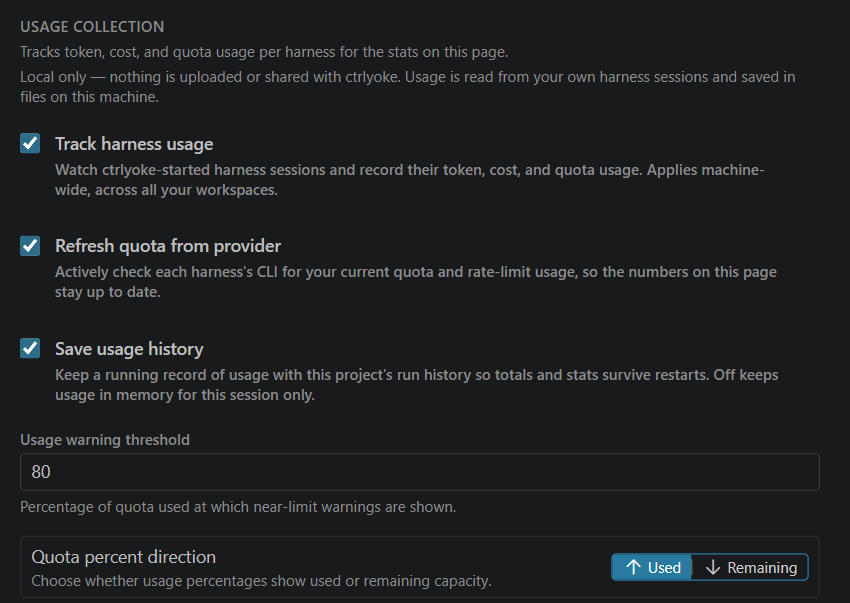
| Setting | What it does |
|---|---|
| Track harness usage | Records token, cost and quota usage for the harness sessions ctrlyoke starts. It applies to every workspace on this machine, so it is a user setting only. |
| Refresh quota from provider | Lets ctrlyoke ask each harness's CLI for your current quota, so the numbers stay up to date between runs. Not every harness can be asked; see What each harness reports. |
| Save usage history | Keeps usage with the project's run history, so totals survive a restart. Off keeps them in memory for this session only. |
| Usage warning threshold | The quota percentage at which the near-limit warning appears. |
| Quota percent direction | Show quota as the percentage Used or Remaining, on this tab and in the status line. |
Workspace statistics
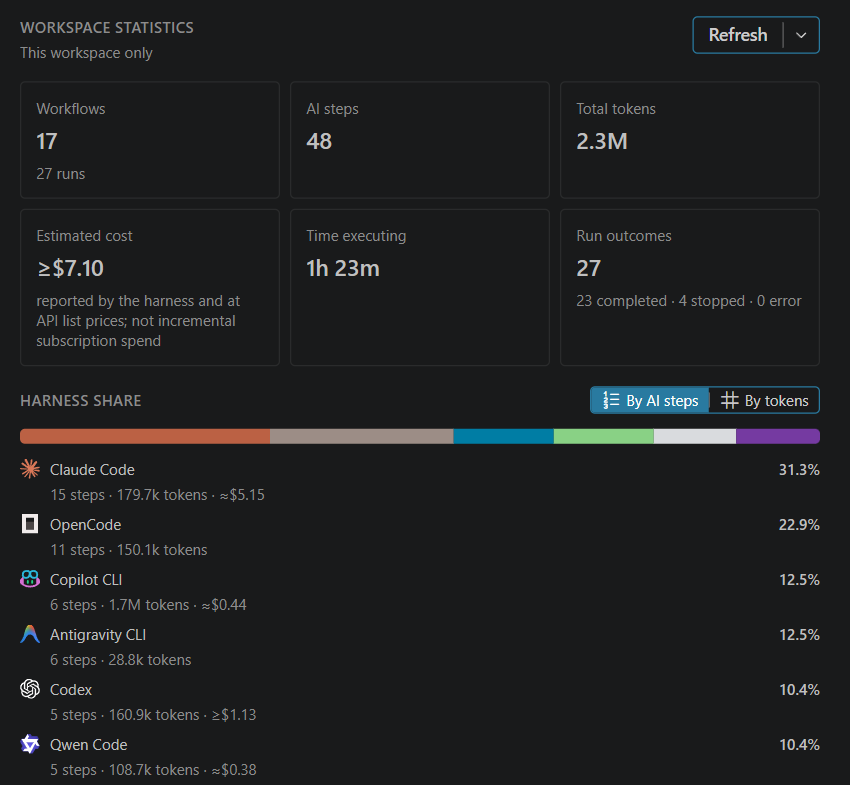
These totals cover the current workspace's run history:
- Workflows (and how many runs), AI steps, Total tokens, Estimated cost, Time executing and Run outcomes (completed, stopped and failed).
- Harness share compares the harnesses you used, By AI steps or By tokens, with each harness's steps, tokens and estimated cost.
Refresh recomputes the statistics (or run ctrlyoke: Refresh Workspace Statistics). Its menu exports them: Copy summary (Markdown), Download Markdown or Download JSON.
Usage per harness
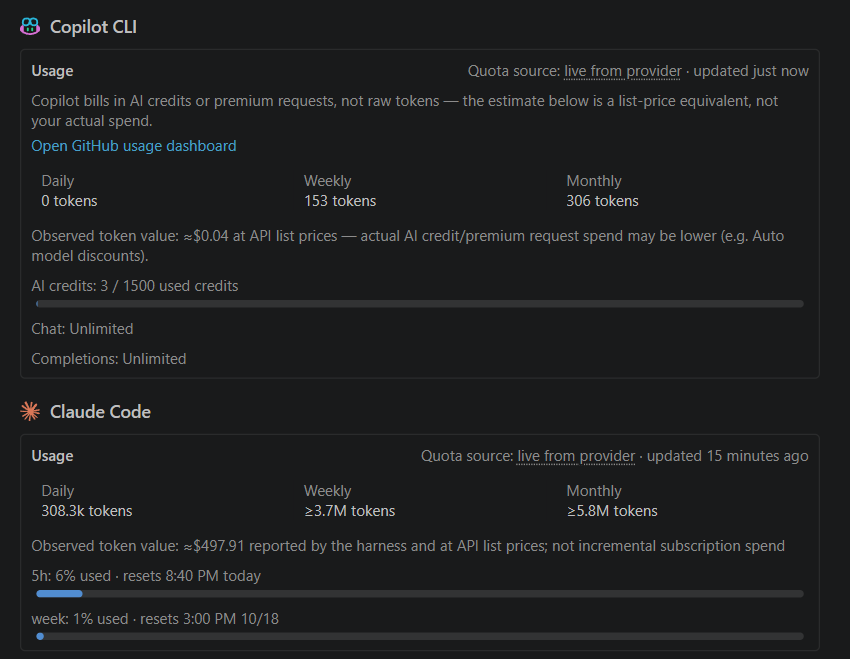
Each harness has a card with the tokens ctrlyoke observed today, this week and this month, and a bar for each quota window it reports, with its reset time. The Quota source says where the quota came from:
| Quota source | Meaning |
|---|---|
| live from provider | Read from the harness or provider directly. |
| from provider logs | Read from the harness's local session log, not a live request. |
| enterprise API | Read from your organization's enterprise usage API. |
| not reported by provider | The harness doesn't expose a quota. Only ctrlyoke's own token counts are shown. |
| no data yet | Nothing read yet. For a harness that reports quota only during a session, run a step. |
Run ctrlyoke: Refresh Harness Usage to read quotas again.
All of these numbers come only from sessions ctrlyoke started. Work you do in a harness outside ctrlyoke isn't counted.
Cost estimates
ctrlyoke estimates cost from each step's token counts at API list prices, or uses the cost the harness itself reports when it reports one. It is not your subscription spend: on a subscription plan, an estimate shows what the same tokens would cost at API prices. ≈ marks an estimate. ≥ marks a lower bound: some steps had no cost, for example because their model has no known price, so the real figure is higher.
To hide every cost estimate, in the dashboard and in the CLI, turn off Show token cost estimates on the General tab (ui.showCostEstimates).
Model pricing overrides
ctrlyoke ships a price table for known models. If a model is missing, or you pay a different rate, add an override under Model pricing overrides: pick a harness, choose or enter a model ID, and enter the rates in US dollars per million tokens. Input and Output are required; leave Cached input, Cache write and Reasoning blank when the harness doesn't report them separately.
The same overrides in ~/.ctrlyoke/settings.json (modelPricing):
{
  "modelPricing": {
    "codex-cli": {
      "gpt-6-luna": { "inputPerMTok": 1.25, "outputPerMTok": 10 }
    },
    "claude-cli": {
      "claude-haiku-5-5": {
        "inputPerMTok": 1,
        "outputPerMTok": 5,
        "cachedInputPerMTok": 0.1,
        "cacheWritePerMTok": 1.25
      }
    }
  }
}
The model ID must match the one the harness reports for the step, which can differ from what you picked. Claude Code, for example, reports claude-haiku-5-5 for the haiku alias. Where the editor offers a list of discovered models, pick from it rather than typing. An override replaces the built-in price for that model completely.
Status line
Claude Code, Copilot, Qwen Code and Antigravity can show a status line at the bottom of their terminal UI. Claude Code and Antigravity report their quota only there, so ctrlyoke installs its own status line command for each of these four harnesses. It is how quota tracking works for them, and you also get a live summary of the model, context and quota inside the harness.
This changes your global harness settings
The status line lives in the harness's machine-wide settings file, for example ~/.claude/settings.json. ctrlyoke changes it the first time it runs that harness, and the change stays in place between runs. If you already had a status line command, ctrlyoke keeps running it underneath. See Files ctrlyoke writes for each file and how to undo it.
OpenCode and Codex don't support a custom status line.
Configure it in Settings → Status Line. These are user settings only, since the files they change are shared by every project.
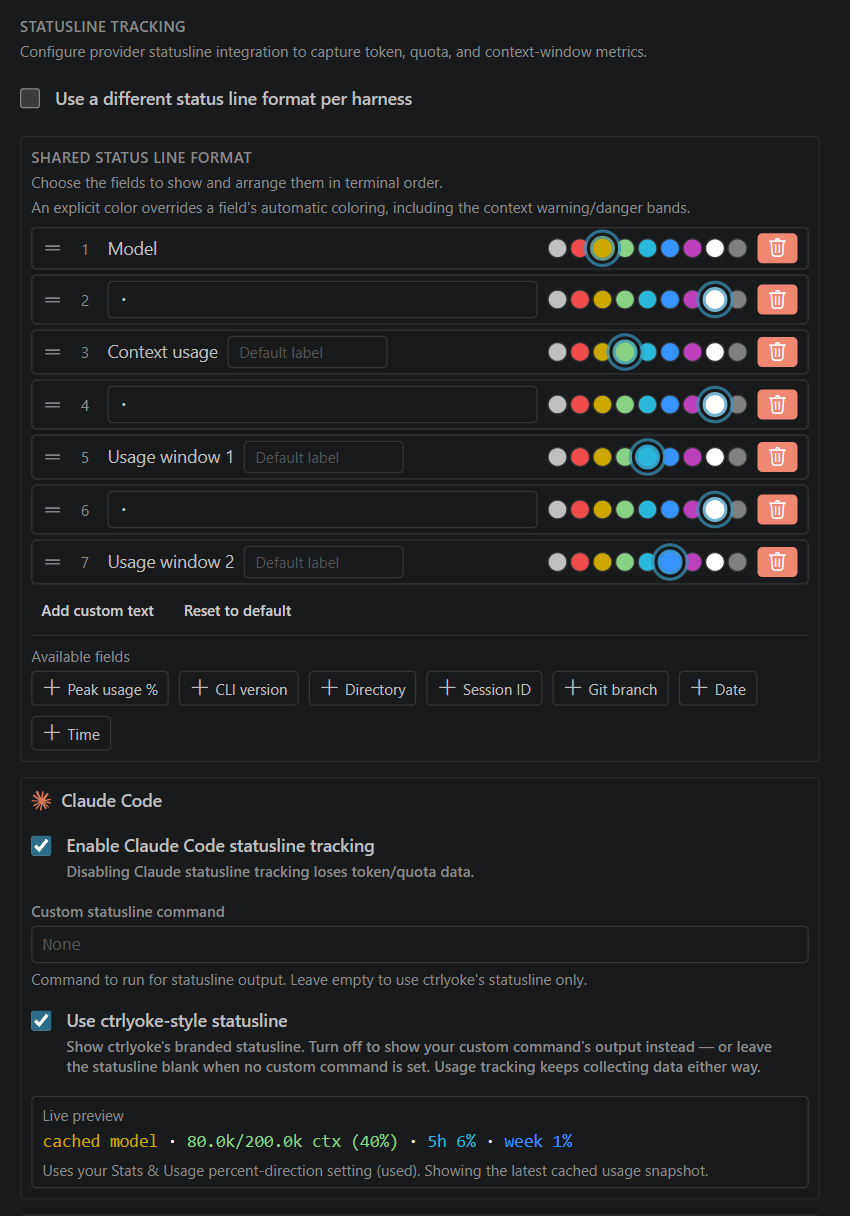
The format
The status line is a row of segments. Drag a row by its handle to reorder it, pick a color, or delete it. Add a field from Available fields, or add your own text with Add custom text. Reset to default goes back to the built-in format: model, context usage and peak usage, ending with a gray "edit in ctrlyoke" reminder of where to change it. Delete that segment like any other.
| Field | Shows |
|---|---|
| Model | The model in use |
| Context usage | Tokens used against the context window; changes color as it fills |
| Peak usage % | Whichever quota window is closest to its limit |
| Usage window 1, Usage window 2 | The first and second quota windows, with their short labels |
| CLI version | The harness's version |
| Directory | The working directory's name |
| Session ID | A shortened session ID |
| Git branch, Date, Time | As named |
Context usage and the usage fields have an optional label box; leave it empty for the default label. A color you choose overrides a field's automatic colors.
By default every harness uses the same Shared Status Line Format. Turn on Use a different status line format per harness to give each harness its own.
Per harness
Each harness has its own section:
- Enable … statusline tracking turns ctrlyoke's status line on or off for that harness. Turning it off asks whether to restore your previous status line command, and stops quota tracking for Claude Code and Antigravity.
- Custom statusline command is your own status line command, which ctrlyoke runs underneath. If you already had one, ctrlyoke fills this in when it installs its own.
- Use ctrlyoke-style statusline shows ctrlyoke's format. Turn it off to show your custom command's output instead, or nothing if there is none. Usage tracking keeps working either way.
- Live preview renders the format with the harness's latest usage.
What each harness reports
| Harness | Quota | Refresh on demand |
|---|---|---|
| Copilot | Monthly premium requests or AI credits; chat and completions | Yes |
| Claude Code | 5-hour and weekly windows, through the status line | No; updates during a session |
| Codex | Its rate-limit windows, usually a short one and a weekly one | Yes, on Codex 0.146 or newer |
| Antigravity | A quota per model tier, through the status line | No; updates during a session |
| OpenCode | None; token counts only | — |
| Qwen Code | None; token counts only | — |
Each harness page has the details under Usage and rate limits, for example Claude Code.