
Script steps and condition scripts
A script step runs a shell command or script file as a queue step, with no AI involved. Use one to build, test, lint or check project state between prompts. End conditions and pre-conditions run scripts the same way, so this page also covers how every script is resolved, run and compared.
steps:
  - name: implement
    prompt: Fix the failing date parser tests in @src/utils/.

  - name: test
    type: script
    script: npm test
    onFail: stopWorkflow

  - name: summarize
    prompt: |
      Summarize the fix. Test run:
      $previous
Passing and failing
A script step passes when the script exits 0, unless it states a comparison (see Comparing output).
| Field | Values |
|---|---|
onPass | continue (default) or stopWorkflow |
onFail | continue (log a warning and advance) or stopWorkflow (default) |
Script steps have no retries. To have a model fix what a script found, put the script in a prompt step's end condition instead.
Comparing output
A script with no compareSource/operator/expected passes when it exits 0. That covers most checkpoints — npm test, npm run lint, tsc — and is why most examples carry no comparison fields at all. There is no boolean form: true and false are not accepted as exit-code values, because exit 0 means "no error", not "true".
To compare output instead, state all three parts. They read as a sentence, and the dashboard shows the same sentence under the controls:
endCondition:
  script: npm test
  compareSource: stdout # which output: exitCode (default), stdout, stderr
  operator: contains # how to compare: eq (default), contains, gte, matches, …
  expected: "0 failing" # what to compare against
The same fields work on a script step, an end condition and a pre-condition.
| Operator | Compares |
|---|---|
eq (default) / ne | The whole trimmed value, literally. No characters are special. |
contains / notContains | Whether the value contains expected as a substring. |
gte / gt / lte / lt | Numbers. Both sides must parse as a number, or the condition fails. |
matches | expected as a regular expression, unanchored — add ^/$ for a full match. |
isEmpty / isNotEmpty | Whether the value is empty. Takes no expected. |
Four things worth knowing:
- The operator is never inferred. The comparison you write is the comparison that runs, whatever the script happens to print.
- Text comparisons ignore the exit code, and
exitCodecomparisons ignore the text. If you need both, that is two scripts, not one. - Text is trimmed and case-sensitive. Add
ignoreCase: truefor a case-insensitiveeq/ne/contains/notContains. - Script output is sanitized before comparison. ANSI control sequences are removed and CRLF line endings become LF, consistently for headless and interactive script execution. The sanitized stdout/stderr are also used by
$endCondition:*and$preCondition:*output references.
Operators are word tokens (gte, not >=). Both operator: >= and operator: != are YAML parse errors. The dashboard still shows you >= and !=.
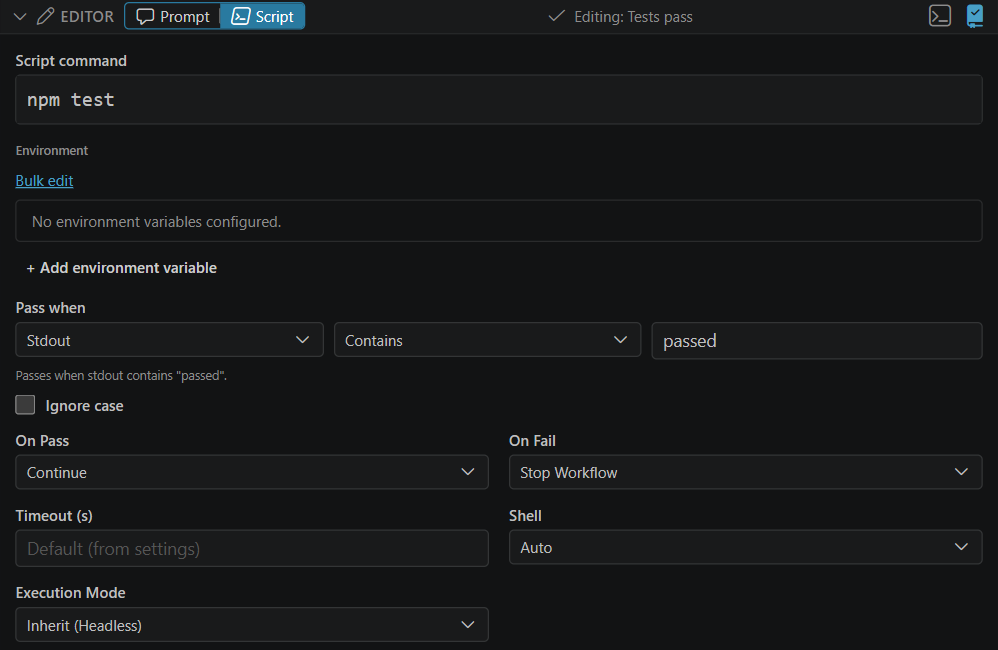
In the step editor, a script step's Pass when row holds the same three parts, with the sentence under it:
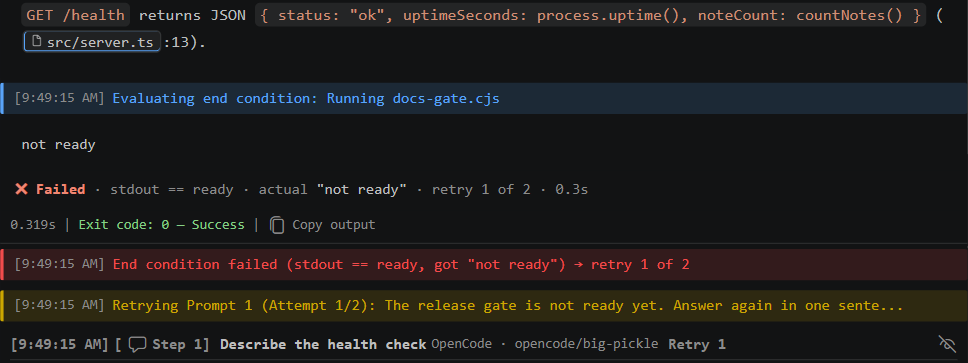
In the output, each check prints its result with the expected and actual values. A failed end condition also shows the retry it triggers:
How scripts run
script is either a path to a script file or an inline command.
A path is looked up relative to the execution directory (the worktree, when the run uses one), then the workspace root, then .ctrlyoke/, then ~/.ctrlyoke/scripts/. A resolved file must stay inside the workspace or ~/.ctrlyoke/scripts/. Text after the path is passed to the script as arguments. The interpreter follows the file extension:
| Extension | Runs with |
|---|---|
.py | python3, falling back to python |
.js, .mjs, .cjs | node |
.ts | node with a local tsx or ts-node |
.sh | sh (bash on Windows) |
.ps1 | PowerShell (-ExecutionPolicy Bypass -File) |
.bat, .cmd | cmd /c (Windows only) |
Files without one of these extensions run directly when executable, or through the interpreter named in their shebang line.
Anything that does not resolve to a file runs as a shell command — pin that shell with shell, otherwise the terminal.shellExecutable setting or the platform default is used. A script value with more than one non-blank line is always run as an inline shell script, never as a file path:
- name: build-and-check
  type: script
  shell: bash
  script: |
    npm run build
    test -f dist/index.js
Scripts run in the execution directory, and workflow variables are exported to them as CTRLYOKE_VAR_<KEY> environment variables.
Environment, secrets and timeouts
envadds environment variables for the script. A secret can be passed only as a${secret:NAME}value, which also grants that secret to the step.secretsgrants a list of stored secrets to the script as environment variables of the same name.timeoutSeclimits how long the script may run. When it is omitted, theexecution.scriptTimeoutSecsetting applies.
Interactive and headless script steps
A script step follows the same executionMode inheritance as a prompt step. In interactive mode it runs in a terminal tab you can watch and type into; in headless mode its output streams to the output pane. Pre-condition and end-condition scripts always run headless.
Using script output in later prompts
A script step's command, stdout, stderr, exit code and verdict are available to later prompts through the usual context references such as $previous and $step:N, and through priorContext. Output is sanitized the same way as for comparisons.
The verdict comes last and says whether the step passed, and against which rule:
<step index="2" type="script" name="Tests">
<command>
npm test
</command>
<stdout>
3 failing
</stdout>
<exitCode>1</exitCode>
<verdict outcome="failed" compareSource="exitCode" operator="eq" expected="0" actual="1"/>
</step>
outcome is passed, failed or errored. A comparison with no expected is reported as the rule that actually ran, exit code eq 0. actual appears only for an exit-code comparison, because a stdout or stderr value is already shown in full above it. A timed-out or errored script adds timedOut="true" or a reason.
Errors are not failures
A script that cannot be run at all — for example an unsupported file type or a spawn failure — is an internal error, not a failed validation. It is handled by the step's errorBehavior policy (stopWorkflow, retry, or continue) rather than by onFail.
See also
- End conditions and pre-conditions: run a script around a prompt step, and retry the prompt when it fails.
- Script step reference: every field.