
Secrets
A workflow often needs a credential: an API key for a script, a token for an MCP server, a database password the agent should use. ctrlyoke lets a workflow refer to a credential by name and hands the value only to the process that runs the step, as an environment variable. The value never goes into the workflow file, the prompt, or the run history.
steps:
  - name: sync inventory
    prompt: Update the inventory table in Supabase using the key !SUPABASE_PAT.

  - name: post report
    type: script
    script: ./scripts/post-report.sh
    secrets: [DEMO_API_KEY]
Secret names are environment-variable names: a capital letter followed by capital letters, digits or underscores (DEMO_API_KEY, SUPABASE_PAT).
Where values come from
A name resolves from the first of these that has it:
- An environment variable of the same name in the environment that started VS Code or the
ctrlyokeCLI. ctrlyoke stores nothing. This is the usual case, and the only one on CI. - A managed secret at workspace scope, for this workspace only.
- A managed secret at user scope, for every workspace.
Managed secrets live in the operating system's encrypted credential store. The dashboard, ctrlyoke CLI, and ctrlyoke server share it on this machine: Windows Credential Manager, the macOS keychain, or secret-tool (libsecret) on Linux. VS Code falls back to its per-profile secret storage when the OS credential store is unavailable. The CLI and ctrlyoke server fall back to an unencrypted secret file readable only by your user, which is the usual case in a container or on a headless Linux server; see Headless hosts and containers. Existing managed secrets in that profile storage are moved to the shared store on activation when it is available. If both stores contain different values, ctrlyoke keeps the value with the newer lastUpdated metadata; when either side lacks usable metadata, it leaves the profile value in place and logs a warning.
The Secrets tab
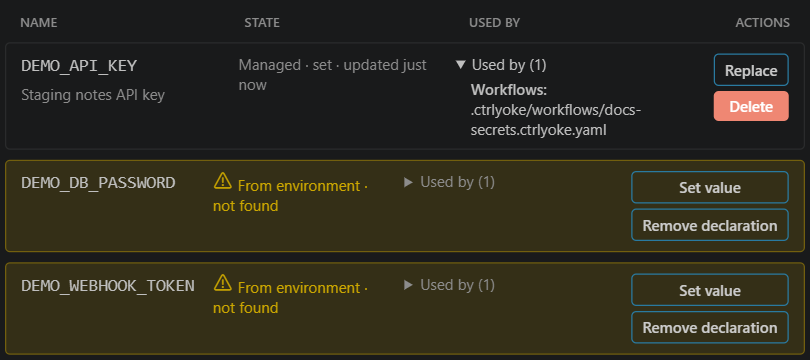
Open the dashboard's settings and choose Secrets. The tab lists every managed secret and every name a workflow declares, with its state:
- Managed · set — a managed value exists.
- From environment · detected — no managed value, but the environment has it.
- From environment · not found — nothing provides a value yet. These rows are highlighted.
Set secret adds a managed value (tick Multi-line value for something like a PEM key). Replace, Set value and Delete act on a row, and Used by lists the workflows and MCP servers that reference the name. The scope switch at the top of the settings drawer picks user or workspace scope. The tab only ever shows names, never values.
From the command line
ctrlyoke secret set DEMO_API_KEY             # prompts for the value, hidden
ctrlyoke secret set DEMO_API_KEY --stdin < key.txt
ctrlyoke secret list
ctrlyoke secret rm DEMO_API_KEY
There is deliberately no command that prints a value. See ctrlyoke secret for every flag.
Granting a secret to a step
A step only receives the secrets it is granted. There are three ways to grant one, and a step's grants are all three combined.
!NAME in prompt text
Writing !NAME in a prompt grants that secret to the step. Type ! in the prompt editor to pick from known names.

The prompt is sent to the harness with !NAME left as it is, followed by a short note telling the model that NAME is an environment variable in its shell, how to read it ($NAME or $env:NAME), and never to print it. The value is set in the harness process's environment, so commands the agent runs can use it.
!NAME inside inline code (backticks) or a fenced code block is not a grant, so you can write about a name without granting it. A ! that isn't followed by a valid name, such as Markdown image syntax , is ignored.
A secrets list
The secrets field grants names without mentioning them in the prompt. It is the only way to grant a secret to a script step. On a prompt step, the model gets the same note about each listed name as it does for !NAME.
secrets: [DEMO_API_KEY]
steps:
  - prompt: Run the integration tests and fix any failures.

  - prompt: Write the release notes.
    secrets: null # this step gets no inherited grants

  - type: script
    script: ./scripts/deploy.sh
secrets: [DEMO_API_KEY, DEPLOY_TOKEN]- A step's own
secretsreplaces the workflow's list; the two are not merged. secrets: nullon a step removes the inherited list.!NAMEin that step's prompt still grants.- A script step receives each granted secret as an environment variable of the same name.
- The
defaults.secretssetting sets the list for new workflows.
In the dashboard, the list is Secrets on the workflow properties panel.
${secret:NAME} in an environment map
When a process expects a credential under a different variable name, or inside a longer value, put ${secret:NAME} in its env map. The reference is replaced with the value when the process starts, and it also grants the secret to the step.
steps:
  - type: script
    script: ./scripts/smoke-test.sh
    env:
      API_URL: https://staging.example.com
      AUTHORIZATION: "Bearer ${secret:DEMO_API_KEY}"
${secret:NAME} works only in values that a process consumes:
envon a script step, a pre-condition or an end conditionenvon a hookenvandheaderson an MCP server
In prompt text it is not substituted. A prompt that contains it is sent as written and the step shows a warning, because a value in the prompt would end up in the model request and the run history. Use !NAME in prompts. Variables can't produce a ${secret:…} reference either.
Approving grants
The first time a workflow grants a secret name in a workspace, ctrlyoke asks you to approve it before the run starts: This workflow requests N secret grant(s). Every grant is ticked; untick one to keep it blocked. Dismissing the prompt asks again next time.
Approval is remembered per workspace and per name, on your machine only, in ~/.ctrlyoke/secret-grants-trust.json. Once you approve DEMO_API_KEY for a workspace, any workflow there can use it without asking. This check exists so that opening someone else's workflow file can't hand your credentials to a step you haven't seen.
A grant that is not approved stops the run before any step starts. From the command line, approve a workflow's grants with:
ctrlyoke trust-secret-grants deploy.ctrlyoke.yaml--yes approves all of them without asking, which is how a CI job approves them. See ctrlyoke trust-secret-grants.
Steps appended while a run is in progress (for example through the dynamic workflow) never see the start-of-run prompt. If such a step grants an unapproved name that has a value, the step fails when it starts.
Missing values
Before a run starts, ctrlyoke checks that every name a not-yet-run step grants has a value. By default a missing value is a warning (Context resolution warning: declared secrets are not available: …) and the run goes ahead without that variable. A step that puts the missing name in an env map still fails, when it starts.
To stop the run instead, set execution.contextResolutionFailure to fail. To check a workflow without running it:
ctrlyoke secret check deploy.ctrlyoke.yamlIt exits 1 for a missing value and 2 for an unapproved grant.
Secrets on CI
CI runners usually have no credential store. Provide each name as an environment variable from your CI system's own secret store, approve the grants with trust-secret-grants --yes, and run headless. See Secrets in CI for a full example.
Redaction
While a run is active, ctrlyoke replaces every secret value it resolved with [REDACTED] wherever it shows or saves output: the output pane and terminal, the browser dashboard, events.jsonl and other run history, logs, CLI output (including --json), Markdown exports and notifications. The match is exact, so it also catches a value the harness happens to print.
On top of that, pattern-based redaction catches things that merely look like credentials, even if ctrlyoke never resolved them: private-key blocks, Bearer tokens, well-known key prefixes (sk-…, ghp_…, AKIA… and others), and assignments such as api_key=… or password: …. If these patterns mangle legitimate output, such as sample code, turn off permissions.heuristicSecretRedactionEnabled (Secret Redaction at the bottom of the Secrets tab). Exact-value redaction stays on regardless.
Redaction protects what ctrlyoke displays and stores. It does not limit what the harness can do with a value it was given: any command the agent runs in that step can read the variable. Grant a secret only to the steps that need it.