
Error handling
A step can go wrong in two different ways, and ctrlyoke handles them separately:
- It ran, and the result was wrong. Tests failed, a pre-condition wasn't met, a script exited non-zero. That is a failed validation, handled by the
onFailof the end condition, pre-condition or script step. - It couldn't run at all. The harness crashed or isn't installed, a script couldn't be started, something timed out. That is an internal error, handled by
errorBehavior.
This page covers errorBehavior, and how pausing, stopping and steering a run fit around it.
errorBehavior
errorBehavior:
  onError: retry # stopWorkflow (default), retry or continue
  maxRetries: 2 # retries after the first attempt; default 1
  retryDelaySec: 30 # wait before each retry

steps:
  - name: implement
    prompt: Add pagination to the /orders endpoint.

  - name: test
    type: script
    script: npm test
onError | What happens |
|---|---|
stopWorkflow | The step is marked failed and the workflow stops. This is the default. |
retry | The phase runs again, up to maxRetries times, waiting retryDelaySec first. Then it stops. |
continue | The step is marked failed with a warning, and the workflow moves on to the next step. |
maxRetries and retryDelaySec only matter with onError: retry. Each retry is a new attempt of the same step, and the output pane shows a status line with the reason and the retry count, such as Retrying attempt 1/2.
What counts as an internal error
| Phase | Internal errors |
|---|---|
| Prompt step | The harness process exited unexpectedly, the harness reported an error, the harness CLI is unavailable, or execution timed out |
| Script step | The script could not be started, or it timed out |
| Pre- and end conditions | The condition script could not be started, or it timed out |
A script that runs and exits non-zero is not an internal error; it is a failed validation, and its onFail decides what happens. So is a comparison that doesn't match, including a numeric operator given non-numeric output.
Worktree setup is outside this policy: it runs before any step is in flight, so a failed setup blocks the worktree and the next Run re-runs it. See Worktrees.
Where the policy comes from
errorBehavior resolves from the most specific level that sets it:
- The step's own
errorBehavior. - The workflow's
errorBehavior. - The
defaults.errorBehaviorsetting, which ctrlyoke copies into a new workflow that doesn't set its own. See Settings.
With none of them set, an internal error stops the workflow. Set a step's errorBehavior to null to turn off an inherited policy for that step only, so it stops on error even though the workflow retries:
errorBehavior:
  onError: retry
  maxRetries: 3
  retryDelaySec: 60

steps:
  - name: research
    prompt: Survey how other modules handle pagination and summarize.

  - name: migrate
    prompt: Write the database migration for the new column.
    errorBehavior: null # never retry a half-applied migration

  - name: notify
    type: script
    script: node scripts/post-status.js
    errorBehavior:
      onError: continue # a failed notification shouldn't stop the run
In the dashboard, set it under Error Behavior on the Validation tab for the workflow, or in the step's properties for one step. The default is under Default Error Behavior in the settings.
errorBehavior vs onFail
errorBehavior | onFail | |
|---|---|---|
| Reacts to | A phase that couldn't run | A phase that ran and failed its check |
| Set on | Step, workflow, or defaults.errorBehavior | Each end condition, pre-condition and script step |
| Retry means | Run the same phase again, unchanged | Send the model a retry prompt in the same session (end conditions) |
| Retry budget | errorBehavior.maxRetries | The condition's own maxRetries |
The two budgets are counted separately. An end condition whose script times out twice uses errorBehavior retries; the same end condition reporting failing tests uses its own maxRetries and retryPrompt.
Worked example
This workflow retries a flaky harness connection, has the model fix failing tests itself, and treats a missing changelog as advisory:
harness: claude-cli

errorBehavior:
  onError: retry
  maxRetries: 2
  retryDelaySec: 20

steps:
  - name: implement
    prompt: Add a --dry-run flag to the import command.
    endCondition:
      script: npm test
      onFail: retry
      maxRetries: 3
      retryPrompt: |
        The tests are failing. Fix the code, not the tests.
        $endCondition:stdout

  - name: changelog
    type: script
    script: node scripts/check-changelog.js
onFail: continue- If Claude CLI exits unexpectedly during implement, the step runs again after 20 seconds, at most twice.
- If
npm testruns and fails, Claude gets the retry prompt with the test output, up to three times. After that the step fails and the workflow stops. - If
npm testcan't be started at all, that's an internal error, retried under the workflow'serrorBehavior. - If the changelog check exits non-zero,
onFail: continuelogs a warning and the run completes.
Pausing, stopping and steering
These controls act on a running workflow from the dashboard header and the prompt editor. See the dashboard tour for where they are.
Pause
Pause takes effect between steps, never in the middle of one. While the current step finishes, the header shows Workflow will pause after the current step completes, with a Cancel button to keep running.
Once paused, nothing is in flight, so the next pending step can be edited, reordered or deleted, and new steps can be inserted before it. Resume continues from that step with your changes. A paused run stays paused across a VS Code restart.
Stop
Stop cancels the step that is running now and ends execution. The cancelled step is marked as cancelled, not failed. Resume continues the run from where it stopped.
When a step fails and the workflow stops, whether from onError: stopWorkflow or an onFail, the run also offers Resume, which runs the failed step again. Fix the cause first, for example by editing the step or installing the missing harness.
Steer
A steer message talks to the model while a step is still working, without waiting for it to finish. Type the message in the prompt editor, open the Run button's menu, and choose Send Steer Message. The text goes straight to the live harness session; it does not add a step to the queue, and any prompt properties you set in the editor are ignored.
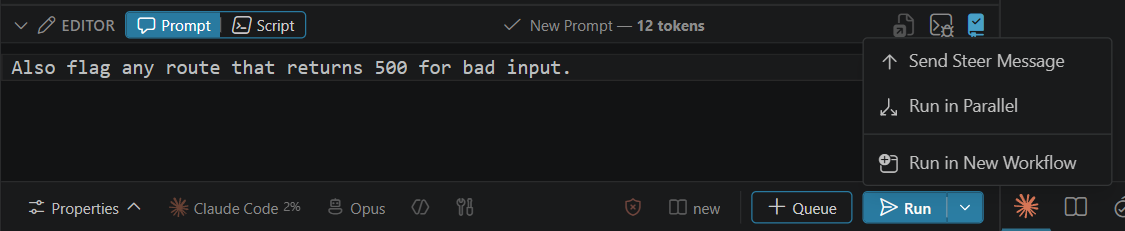
Steering needs a live interactive session: the step must be running in interactive mode with its harness tab open in the terminal. Otherwise the menu item is disabled and its tooltip says why, for example No live harness session for this workflow. Steering is only available for prompt steps.
See also
- End conditions and pre-conditions:
onFail,onPassand retry prompts. - Script steps: when a script is an error and when it is a failure.
errorBehaviorreference anddefaults.errorBehavior.